






 AI Coding Remote Desktop
AI Coding Remote Desktop
AI Coding Remote Desktop
AI Coding Remote Desktop
AIRD

ABOUT
ABOUT
AI Coding Remote Desktop is a remote desktop application implemented with a minimal set of features.
The coding for this app is performed 100% by AI alone.
The implemented features are minimal, but
Performance has already reached a practical level at this stage.
The coding for this app is performed 100% by AI alone.
The implemented features are minimal, but
Performance has already reached a practical level at this stage.
System Requirements
SPEC
Server (the side being operated on)
・Windows11
Client (the operating side)
・Modern Web Browsers (PC and smartphone)
・Windows11
Client (the operating side)
・Modern Web Browsers (PC and smartphone)
How To Use
HOW TO USE
This application runs as a single binary.
Please download it from the Releases section and launch RemoteDesktop.exe.
The client (viewer) uses a web browser.
Please access the following URL from another device.
Example: http://192.168.xxx.xxx:8090/
※ Specify the private IP address of the device running RemoteDesktop.exe for 192.168.xxx.xxx.
Please download it from the Releases section and launch RemoteDesktop.exe.
The client (viewer) uses a web browser.
Please access the following URL from another device.
Example: http://192.168.xxx.xxx:8090/
※ Specify the private IP address of the device running RemoteDesktop.exe for 192.168.xxx.xxx.
This application was created primarily for the purpose of verifying AI coding.
This implementation does not take security into consideration.
Use only for testing purposes within a secure network.
This implementation does not take security into consideration.
Use only for testing purposes within a secure network.
To prevent misuse by users with insufficient knowledge and unintended connections from external sources,
This implementation only permits connections from private IP addresses (192.168.x.x).
This restriction cannot be changed.
This implementation only permits connections from private IP addresses (192.168.x.x).
This restriction cannot be changed.
Performance
PERFORMANCE
Despite its simple implementation,
This app's performance has reached a practical level.
In terms of feel, Chrome Remote Desktop or
It holds its own against general commercial remote desktop applications.
Non-action games could also be played.
On an AMD Ryzen 7 5800H (3.2GHz) system,
It can process 1920×1080 screen transfers at approximately 25 milliseconds per frame.
If anyone would like to try improving it for even greater speed,
First, we recommend replacing the JPEG encoder with a faster implementation.
This app's performance has reached a practical level.
In terms of feel, Chrome Remote Desktop or
It holds its own against general commercial remote desktop applications.
Non-action games could also be played.
On an AMD Ryzen 7 5800H (3.2GHz) system,
It can process 1920×1080 screen transfers at approximately 25 milliseconds per frame.
If anyone would like to try improving it for even greater speed,
First, we recommend replacing the JPEG encoder with a faster implementation.
Startup Options
OPTION
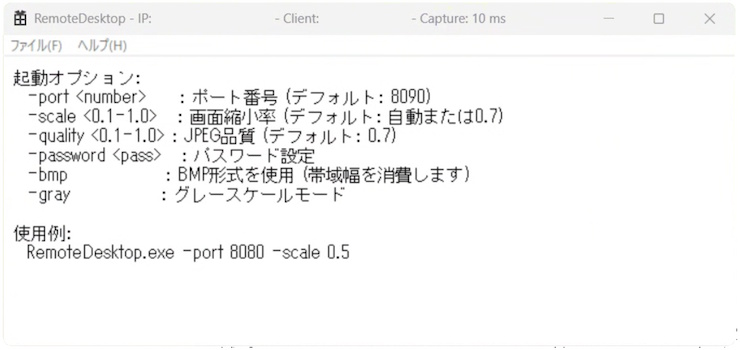
-port : Port Number (Default: 8090)
-scale 0.1-1.0 : Screen Scaling (Default: Auto or 0.7)
-quality 0.1-1.0 : JPEG Quality (Default: 0.7)
-password : Password Settings (BASIC Authentication)
-bmp : Use BMP format (Consumes bandwidth)
-gray : Grayscale mode
※BASIC authentication is a simple authentication method designed for use within secure networks.
Usage Examples
RemoteDesktop.exe -port 8080 -scale 0.5
-scale 0.1-1.0 : Screen Scaling (Default: Auto or 0.7)
-quality 0.1-1.0 : JPEG Quality (Default: 0.7)
-password : Password Settings (BASIC Authentication)
-bmp : Use BMP format (Consumes bandwidth)
-gray : Grayscale mode
※BASIC authentication is a simple authentication method designed for use within secure networks.
Usage Examples
RemoteDesktop.exe -port 8080 -scale 0.5
Development Environment
STACK
・Language: C++
・Development Environment: Microsoft Visual C++ 2026
・Framework: Native Windows API
・AI Coding IDE: Google Antigravity
・AI Model: Gemini 3 Pro (High)
This is a technology stack not often adopted in so-called vibecoding, but
Given the nature of remote desktop applications, minimizing latency is our top priority,
I selected C++ and the Native Windows API.
・Development Environment: Microsoft Visual C++ 2026
・Framework: Native Windows API
・AI Coding IDE: Google Antigravity
・AI Model: Gemini 3 Pro (High)
This is a technology stack not often adopted in so-called vibecoding, but
Given the nature of remote desktop applications, minimizing latency is our top priority,
I selected C++ and the Native Windows API.
Development Methodology
METHODOLOGY
Implemented using Antigravity, solely based on instructions from Japanese prompts.
The coding work was performed 100% by AI alone.
The coding work was performed 100% by AI alone.
Prompt
PROMPT
I haven't used any special techniques in the prompt itself,
The requirements had to be described as specifically as possible in order to achieve performance.
For example,
Please capture the entire desktop screen.
Even with such vague instructions, implementation will proceed,
In that case, an outdated API from the Windows 95 era would be used,
Performance was extremely poor and rendered it unusable.
Therefore
The requirements had to be described as specifically as possible in order to achieve performance.
For example,
Please capture the entire desktop screen.
Even with such vague instructions, implementation will proceed,
In that case, an outdated API from the Windows 95 era would be used,
Performance was extremely poor and rendered it unusable.
Therefore
Please capture the entire desktop screen using the Windows Graphics Capture API.
There is no need to consider environments that do not support the Windows Graphics Capture API.
We provide specific prompts that explicitly state the APIs to be used.There is no need to consider environments that do not support the Windows Graphics Capture API.
Since it's a strongly typed language, errors are immediately apparent.
TYPE
Because we are using C++, a statically typed language,
It was easy to pinpoint the error locations, making it simple to instruct the AI on corrections.
The most frequent errors during development occurred when
It was an error in handling double quotation marks within the HTML embedded in Network.h,
This naturally caused a compilation error, so I was able to fix it simply by specifying the relevant line.
In dynamically typed languages, since they don't generate compile errors,
Reading through the massive amount of code generated by AI to pinpoint errors seems like a daunting task.
It was easy to pinpoint the error locations, making it simple to instruct the AI on corrections.
The most frequent errors during development occurred when
It was an error in handling double quotation marks within the HTML embedded in Network.h,
This naturally caused a compilation error, so I was able to fix it simply by specifying the relevant line.
In dynamically typed languages, since they don't generate compile errors,
Reading through the massive amount of code generated by AI to pinpoint errors seems like a daunting task.
AI does not add external libraries.
LIBRARY
Even when I instructed the AI to install an external library, it said it couldn't add it.
C++ is difficult because it lacks a well-developed library packaging system.
Therefore, I implemented it using only the Windows API.
If the language has a well-established library package system, there should be no problem.
C++ is difficult because it lacks a well-developed library packaging system.
Therefore, I implemented it using only the Windows API.
If the language has a well-established library package system, there should be no problem.
The generated code is spaghetti, but it's not hopeless.
CODE QUALITY
The code generated by AI is still quite spaghetti code (disorganized).
However, it's not hopeless—it seems manageable enough to sort out properly later.
The files are split into larger units called Capture.h and Network.h,
The implementation within it is also partially divided into methods.
For some reason, it only adds header files (does not add .cpp files),
They tend to cram everything into one method and refuse to externalize embedded HTML.
Despite some issues, the code is more readable than I had anticipated.
However, it's not hopeless—it seems manageable enough to sort out properly later.
The files are split into larger units called Capture.h and Network.h,
The implementation within it is also partially divided into methods.
For some reason, it only adds header files (does not add .cpp files),
They tend to cram everything into one method and refuse to externalize embedded HTML.
Despite some issues, the code is more readable than I had anticipated.
Can even beginners develop apps with Vibecoding?
VIBECODING
・ Capture the entire screen
・ Continuously transfer images to the browser
・ Send mouse operations from the browser to reproduce them at the same position
Simply specify concrete specifications like this in the Japanese prompt,
The implementation was completed without any instructions regarding the actual coding process.
Some technical knowledge is required, such as specifying the API name for performance purposes, but
It was perfectly acceptable to say that no knowledge of C++ was required at all.
It seems difficult for someone with absolutely no knowledge to develop an app with the specifications they want, but
I can come up with a rough logic, but it can't be expressed in a programming language.
Even someone like that felt they could complete the app.
・ Continuously transfer images to the browser
・ Send mouse operations from the browser to reproduce them at the same position
Simply specify concrete specifications like this in the Japanese prompt,
The implementation was completed without any instructions regarding the actual coding process.
Some technical knowledge is required, such as specifying the API name for performance purposes, but
It was perfectly acceptable to say that no knowledge of C++ was required at all.
It seems difficult for someone with absolutely no knowledge to develop an app with the specifications they want, but
I can come up with a rough logic, but it can't be expressed in a programming language.
Even someone like that felt they could complete the app.
Remote desktop? Surprisingly easy to set up.
REMOTEDESKTOP
The original purpose was to verify the vib coding, but
After implementation, my impression is that,
Even with a simple design, you can make a surprisingly functional remote desktop app, huh?
The result was that it left a stronger impression.
To create a remote desktop application that functions to a certain extent,
Capture the screen at the GPU driver level,
Compressed using a video encoder specifically tuned for crispness,
Performing meticulous control to synchronize packets...
Without implementing something quite advanced like that, it's far too slow to be of any use whatsoever.
I had this image in my mind, so I'm surprised it actually works with such a simple implementation.
This was something I couldn't have known until I actually implemented it,
You can quickly turn these ideas into something tangible and test them out.
That's where you start to sense the potential of vibrating coding.
After implementation, my impression is that,
Even with a simple design, you can make a surprisingly functional remote desktop app, huh?
The result was that it left a stronger impression.
To create a remote desktop application that functions to a certain extent,
Capture the screen at the GPU driver level,
Compressed using a video encoder specifically tuned for crispness,
Performing meticulous control to synchronize packets...
Without implementing something quite advanced like that, it's far too slow to be of any use whatsoever.
I had this image in my mind, so I'm surprised it actually works with such a simple implementation.
This was something I couldn't have known until I actually implemented it,
You can quickly turn these ideas into something tangible and test them out.
That's where you start to sense the potential of vibrating coding.
About MMGames
For game and application developmentA programmer with a burning passion
Representative work is the definitive C language introductory site.
Learning C through Suffering.
